
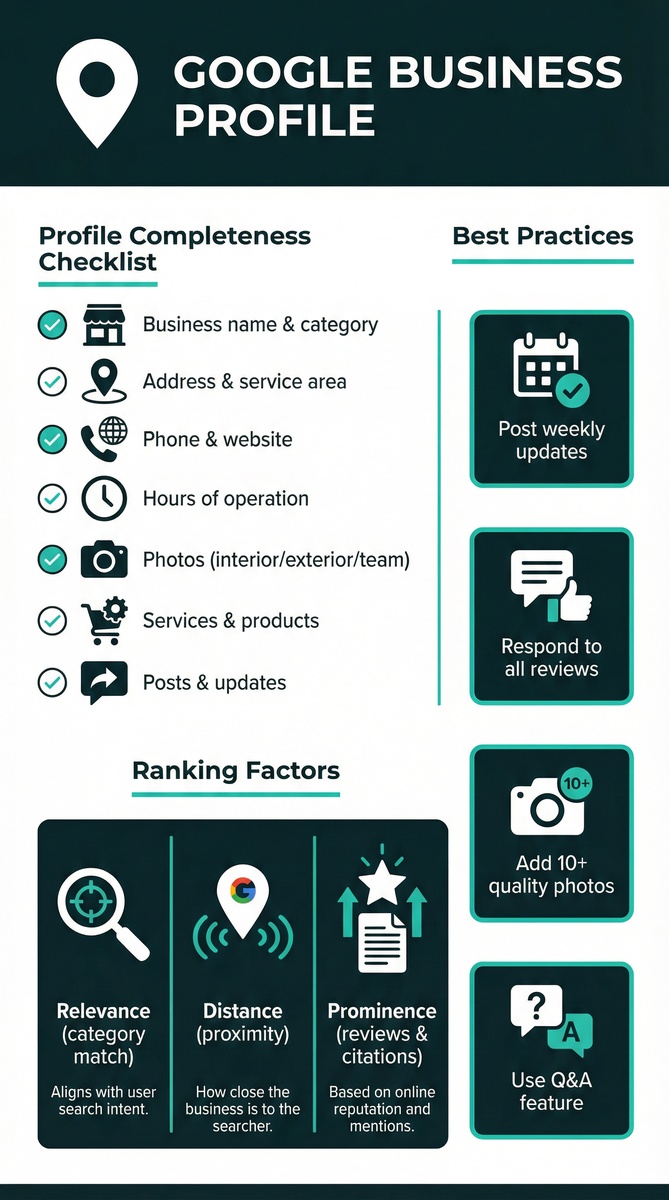
Why Google Business Profile Matters
Your Google Business Profile is the first thing most potential customers see before they ever visit your website. Yet most businesses set it up once, never touch it again, and wonder why competitors with seemingly weaker brands appear above them in local search. A neglected profile is one of the fastest ways to leak customers to rivals. This guide covers everything that needs to happen inside your profile: from the basics of setup to the advanced optimisation levers that most business owners don't know exist.
Your Google Business Profile (GBP) is often the first impression potential customers have of your business. It appears in Google Search, Google Maps, and increasingly in AI-generated responses.
Key Statistics:
- 46% of all Google searches have local intent
- 88% of consumers who search locally visit a store within 24 hours
- Businesses with complete GBP listings are 70% more likely to attract visits
- 64% of consumers use GBP to find contact details
Setting Up Your Profile
Step 1: Claim or Create Your Listing
- Go to google.com/business
- Search for your business
- Claim existing listing or create new one
- Verify ownership (postcard, phone, email, or instant)
Step 2: Choose the Right Categories
Category selection is one of the most impactful decisions you will make for your Google Business Profile. Your primary category directly influences which searches your business appears for, so choosing the most specific and relevant category is essential. For example, a dental practice should select "Dentist" as the primary category rather than the broader "Healthcare" category. Add secondary categories for additional services you offer, but avoid adding irrelevant categories in an attempt to appear for more searches, as this can dilute your relevance and harm your rankings.
Your primary category is crucial for rankings. Choose the most specific category that accurately describes your business.
| Business Type | Good Category | Better Category |
|---|---|---|
| Aesthetic Clinic | Medical Spa | Aesthetic Medicine Clinic |
| Restaurant | Restaurant | Italian Restaurant |
| Dentist | Dentist | Cosmetic Dentist |
Step 3: Complete Every Section
Business Information:
- Accurate business name (no keyword stuffing)
- Complete address
- Local phone number
- Website URL
- Business hours (including special hours)
- Explains what you do
- Highlights unique selling points
- Includes relevant keywords naturally
- Has a clear call-to-action
- Accessibility features
- Payment methods
- Health and safety measures
- Service options
Optimising for Maximum Visibility
Photos and Videos
Visual content significantly impacts engagement:
Photo Types to Add:
- Logo (square, high resolution)
- Cover photo (landscape, represents your business)
- Exterior photos (help customers find you)
- Interior photos (show your space)
- Team photos (build trust)
- Product/service photos (show what you offer)
- Add new photos weekly
- Use high-quality images (minimum 720px)
- Geo-tag photos when possible
- Include photos of your team at work
Products and Services
List all your products and services with:
- Clear names
- Detailed descriptions
- Pricing (if applicable)
- High-quality images
Posts
GBP posts appear in your listing and can drive engagement:
Post Types:
- Updates (general news)
- Offers (promotions with dates)
- Events (with dates and times)
- Products (featured items)
Managing Reviews
Reviews are critical for both rankings and conversions.
Generating Reviews
Systematic Approach:
- Ask satisfied customers directly
- Send follow-up emails with review links
- Include review requests in receipts
- Train staff to request reviews
- Search for your business on Google
- Click "Write a review"
- Copy the URL
- Use URL shortener for easy sharing
Responding to Reviews
Positive Reviews:
- Thank the customer by name
- Reference specific details from their review
- Invite them back
- Respond promptly (within 24 hours)
- Apologise for their experience
- Take the conversation offline
- Never argue publicly
Advanced Optimisation
Q&A Section
Monitor and manage the Q&A section:
- Answer questions promptly
- Seed common questions yourself
- Use keywords naturally in answers
Booking Integration
If applicable, enable booking:
- Direct booking through GBP
- Integration with booking platforms
- Appointment links
Messaging
Enable messaging for direct customer communication:
- Set up automated welcome message
- Respond within 24 hours
- Use for customer service
Measuring Success
Track these metrics in GBP Insights:
| Metric | What It Measures | Target |
|---|---|---|
| Search Views | How often you appear | Increasing trend |
| Map Views | Maps visibility | Increasing trend |
| Website Clicks | Traffic driven | Increasing trend |
| Direction Requests | Intent to visit | Increasing trend |
| Phone Calls | Direct enquiries | Increasing trend |
Common Mistakes to Avoid
- Keyword stuffing in business name - Violates guidelines, risks suspension
- Inconsistent NAP - Confuses Google, hurts rankings
- Ignoring reviews - Damages reputation, loses customers
- Outdated information - Frustrates customers, loses trust
- No photos - Reduces engagement significantly
Conclusion
A well-optimised Google Business Profile is essential for local business success. Invest time in setting it up correctly, then maintain it with regular updates, fresh photos, and prompt review responses.
Need help optimising your Google Business Profile? Our local SEO specialists can audit your listing and implement best practices to maximise your visibility.
---
Related Reading
Related Services
- Local SEO & Google Maps - Dominate local search
- SEO Services - Complete organic growth
- Website Maintenance - Ongoing optimisation