
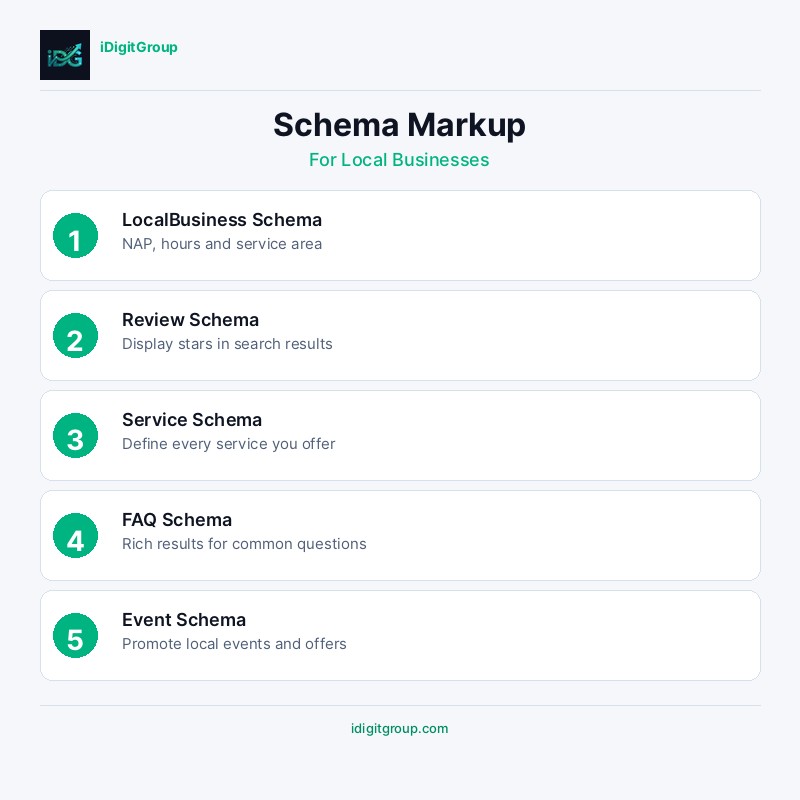
Schema markup takes less than an afternoon to implement correctly and can produce visible improvements in how your business appears in search results within weeks. Rich results (star ratings, FAQ dropdowns, business hours, event listings) are almost entirely dependent on schema markup. Yet the majority of local business websites have either no schema, incorrectly implemented schema, or schema that contradicts the information on the page itself. This guide covers the specific markup types that matter for local businesses and how to implement each one without getting lost in the technical detail.
This guide will walk you through everything you need to know about implementing schema markup for your local business in 2026.
What is Schema Markup?
Schema markup is a standardised vocabulary of structured data that helps search engines understand the content and context of your web pages. By adding schema markup to your website's HTML, you provide explicit signals about your business type, location, services, reviews, and other key information. This structured data enables search engines to display rich results, including star ratings, business hours, price ranges, and FAQ answers directly in search results. For local businesses, schema markup is particularly powerful because it enhances visibility in local search results and helps AI search engines accurately cite your business information.
Why is Schema Markup Important for Local SEO?
Local businesses that implement comprehensive schema markup see measurable improvements in search visibility. According to recent studies, websites with structured data receive 30% more organic clicks than those without. Schema markup helps Google understand your business entity, which is increasingly important as search evolves toward entity-based understanding. It also feeds directly into Google's Knowledge Graph, which powers both traditional search results and AI-generated answers. For businesses targeting local customers, LocalBusiness schema, along with its subtypes like MedicalBusiness, LegalService, and RealEstateAgent, provides the most relevant structured data signals.
Schema markup (or structured data) is a vocabulary of code that you add to your website to help search engines like Google understand your content more effectively. It translates your human-readable content into a machine-readable format. For a local business, this means you can explicitly tell Google your business name, address, phone number, opening hours, services offered, and much more.
Why is Schema Markup Important for Local SEO?
- Enhanced Visibility: Schema can help you earn rich results in the SERPs (Search Engine Results Pages), such as star ratings, review snippets, and event schedules, making your listing more eye-catching.
- Improved Local Rankings: While not a direct ranking factor, the clarity that schema provides can help Google more confidently rank your business for relevant local queries.
- Voice Search Optimisation: Voice assistants like Siri and Google Assistant rely heavily on structured data to provide direct answers to user queries like "find a plumber near me that is open now."
- AI and GEO Readiness: As search evolves towards AI-driven answers (Generative Engine Optimisation), structured data becomes critical for ensuring AI models can accurately interpret and cite your business information.
Essential Schema Types for Local Businesses
The most impactful schema types for local businesses include LocalBusiness (or its specific subtypes), FAQPage, Review, Service, and BreadcrumbList. Each serves a distinct purpose in communicating your business information to search engines.
LocalBusiness schema should include your business name, address, phone number, opening hours, geo-coordinates, price range, and accepted payment methods. This information must match your Google Business Profile exactly to avoid conflicting signals.
FAQPage schema is particularly valuable because it can trigger FAQ rich results in search, displaying your questions and answers directly on the results page. This significantly increases your listing's visual footprint and click-through rate.
1. Implementing LocalBusiness Schema
Start with the most specific subtype that applies to your business. For example, a dental practice should use "Dentist" rather than the generic "LocalBusiness". Include all available properties: name, address, telephone, openingHours, geo coordinates, priceRange, image, and sameAs links to your social media profiles. Test your implementation using Google's Rich Results Test tool to ensure there are no errors or warnings.
2. Adding Review and Rating Schema
Aggregate rating schema displays star ratings in search results, which can increase click-through rates by up to 35%. Ensure your review schema accurately reflects genuine customer reviews and follows Google's guidelines. Never fabricate or manipulate review data, as this violates Google's policies and can result in manual penalties.
Common Schema Markup Mistakes to Avoid
Many businesses implement schema markup incorrectly, which can result in rich result penalties or simply no benefit at all. The most common mistakes include using incorrect schema types (e.g., using "Organization" instead of a specific LocalBusiness subtype), providing incomplete information, including markup for content that does not appear on the page, and failing to update schema when business information changes. Another frequent error is implementing review schema for self-authored reviews rather than genuine third-party customer reviews, which violates Google's guidelines.
Ensure your schema markup accurately reflects the visible content on each page. Google's guidelines explicitly state that structured data must represent content that is visible to users. Hidden or misleading structured data can result in manual actions that remove your rich results entirely.
Testing and Maintaining Schema Markup
After implementing schema markup, regularly test your pages using Google's Rich Results Test and Schema Markup Validator. Monitor Google Search Console for any structured data errors or warnings. Schema markup requires ongoing maintenance as your business information changes, new services are added, or schema.org vocabulary is updated.
While there are hundreds of schema types, a few are essential for any local business. You should implement these on your homepage and relevant service pages.
1. LocalBusiness and its Specific Types
This is the most important schema for any local business. It tells search engines that you have a physical location. It is highly recommended to use a more specific type of LocalBusiness if one exists for your industry.
Examples of more specific types include:
DentistPlumberRestaurantMedicalClinicRealEstateAgent
nameaddress(using thePostalAddresstype)telephoneopeningHoursgeo(withGeoCoordinates)image(your logo)priceRange
2. Organization
This schema helps establish your brand as an entity. It should be used in conjunction with LocalBusiness.
Key Properties to Include:
namelogourl(your homepage)sameAs(links to your social media profiles)
3. Service
For each service you offer, you should create a dedicated service page and mark it up with Service schema. This helps you rank for specific service-related queries.
Key Properties to Include:
name(of the service)descriptionprovider(linking to yourLocalBusinessentity)areaServed
4. FAQPage
If you have a Frequently Asked Questions section on your pages, marking it up with FAQPage schema can make your answers appear directly in the search results, dominating more SERP real estate.
5. BreadcrumbList
This schema helps search engines understand your site structure and can result in breadcrumb trails appearing in your search snippets, which improves user experience.
How to Implement Schema Markup
Implementing schema can seem technical, but there are tools that make it easier.
Step 1: Generate the Schema Markup
You can write the JSON-LD code by hand, but it is often easier to use a generator tool like Google's Structured Data Markup Helper or Merkle's Schema Markup Generator. You simply input your business information, and the tool generates the required code.
Step 2: Add the JSON-LD to Your Website
JSON-LD is the recommended format by Google for implementing schema. It is a JavaScript snippet that you can add to the section of your HTML page. This is generally cleaner than using microdata, which involves adding tags directly into your body HTML.
Step 3: Test Your Markup
Once you have added the schema to your site, you must test it to ensure it is free of errors. Use Google's Rich Results Test tool. It will show you which rich results can be generated from your markup and highlight any errors or warnings.
Common Schema Mistakes to Avoid
- Using the Wrong Type: Using
Organizationinstead of a more specificLocalBusinesstype is a common mistake. - Inaccurate Information: Ensure the information in your schema (especially NAP - Name, Address, Phone) exactly matches what is displayed on your website and your Google Business Profile.
- Hidden Content: Do not put information in your schema that is not visible to users on the page. This is against Google's guidelines.
Frequently Asked Questions (FAQ)
Q: Will schema markup guarantee me rich results? A: No. Implementing schema makes you eligible for rich results, but it is ultimately Google's decision whether to show them for a particular query. High-quality content and a good user experience are also crucial.
Q: Can I use multiple schema types on one page?
A: Yes, and you should. It is common to have Organization, LocalBusiness, WebSite, and BreadcrumbList all on the homepage. You can nest them or list them separately within a @graph block.
Q: Where can I find a full list of LocalBusiness types?
A: The official Schema.org website has a full list of all LocalBusiness types and their properties. You can browse the hierarchy to find the most specific type for your business.