
Introduction: Why Core Web Vitals Matter
Core Web Vitals aren't a compliance exercise. They're a direct measure of whether your site gives users a good experience. Google doesn't just reward fast, stable, responsive pages because it's policy; it does so because pages that pass CWV thresholds retain users better, generate fewer bounces, and produce the engagement signals that correlate with quality in Google's models. This guide covers what each metric actually measures, how to diagnose problems, and exactly what to fix when your Lighthouse score isn't where it needs to be.
Core Web Vitals are not just about SEO, they directly impact conversions, bounce rates, and revenue. Research shows that improving Core Web Vitals can increase conversions by up to 24% and reduce bounce rates by 30%.
"Sites meeting Core Web Vitals thresholds are 24% less likely to see users abandon page loads.", Google Chrome Team
This comprehensive guide will explain what Core Web Vitals are, how to measure them, and exactly how to optimise your website to achieve excellent scores.
Understanding Core Web Vitals
The Three Core Metrics
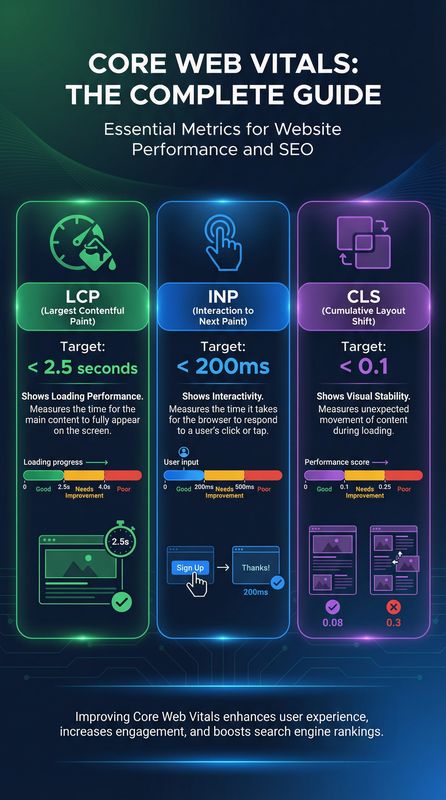
| Metric | Full Name | What It Measures | Good | Needs Improvement | Poor |
|---|---|---|---|---|---|
| LCP | Largest Contentful Paint | Loading performance | ≤2.5s | 2.5-4.0s | >4.0s |
| INP | Interaction to Next Paint | Responsiveness | ≤200ms | 200-500ms | >500ms |
| CLS | Cumulative Layout Shift | Visual stability | ≤0.1 | 0.1-0.25 | >0.25 |
What Each Metric Means
LCP (Largest Contentful Paint)
LCP measures how long it takes for the largest visible content element to load. This is typically:
- Hero images
- Large text blocks
- Video poster images
- Background images with text overlay
INP (Interaction to Next Paint)
INP measures the time from a user interaction (clicking a link, tapping a button, pressing a key) to the next frame the browser paints in response, and it reports the worst interaction across the visit.
Why it matters: If users click a button and nothing happens, they assume the site is broken. High INP creates frustration and abandonment.
CLS (Cumulative Layout Shift)
CLS measures how much the page layout shifts unexpectedly during loading. Common causes include:
- Images without dimensions
- Ads or embeds that load late
- Dynamically injected content
- Web fonts causing text reflow
Measuring Core Web Vitals
Measurement Tools
| Tool | Type | Best For | Data Source |
|---|---|---|---|
| PageSpeed Insights | Lab + Field | Quick checks, recommendations | CrUX + Lighthouse |
| Google Search Console | Field | Site-wide trends, issues | CrUX |
| Chrome DevTools | Lab | Debugging, development | Local testing |
| Lighthouse | Lab | Detailed audits | Simulated |
| Web Vitals Extension | Field | Real-time monitoring | Live page |
| GTmetrix | Lab | Detailed waterfall analysis | Simulated |
Lab vs Field Data
| Data Type | Source | Pros | Cons |
|---|---|---|---|
| Lab data | Simulated tests | Consistent, debuggable | May not reflect real users |
| Field data | Real user measurements | Actual user experience | Takes time to collect |
Optimising Largest Contentful Paint (LCP)
Common LCP Issues and Solutions
| Issue | Impact | Solution |
|---|---|---|
| Slow server response | High | Upgrade hosting, implement caching |
| Render-blocking resources | High | Defer non-critical CSS/JS |
| Large images | High | Compress, use modern formats |
| Client-side rendering | High | Server-side rendering |
| Third-party scripts | Medium | Defer, lazy load |
LCP Optimisation Checklist
Server Optimisation
- ☐ Use a CDN for static assets
- ☐ Enable server-side caching
- ☐ Optimise database queries
- ☐ Use HTTP/2 or HTTP/3
- ☐ Enable compression (Gzip/Brotli)
Resource Optimisation
- ☐ Preload critical resources
- ☐ Inline critical CSS
- ☐ Defer non-critical JavaScript
- ☐ Remove unused CSS/JS
- ☐ Optimise web fonts
Image Optimisation
Property images are the most important element of any listing, and their SEO optimisation is frequently overlooked. Every image should have a descriptive filename (e.g., "3-bedroom-victorian-house-richmond-living-room.jpg" rather than "IMG_4521.jpg") and a detailed alt tag that describes both the room and the property. Compress images to under 200KB without sacrificing quality, and use WebP format where possible for faster loading times. Include at least 10-15 high-quality photos per listing, covering every room, the exterior, garden, and local area. Properties with more photos receive 2-3 times more enquiries than those with fewer than 5 images.
Consider adding virtual tours and floor plans, which not only improve user engagement but also provide additional indexable content. Embed videos with descriptive titles and transcripts to further enhance the listing's SEO value.
- ☐ Use modern formats (WebP, AVIF)
- ☐ Compress images appropriately
- ☐ Serve responsive images
- ☐ Lazy load below-fold images
- ☐ Preload hero images
Optimising Interaction to Next Paint (INP)
Common INP Issues and Solutions
| Issue | Impact | Solution |
|---|---|---|
| Heavy JavaScript | High | Code splitting, tree shaking |
| Long tasks | High | Break up long tasks |
| Third-party scripts | High | Defer, lazy load |
| Large DOM | Medium | Simplify page structure |
| Memory leaks | Medium | Fix JavaScript issues |
INP Optimisation Strategies
JavaScript Optimisation
| Strategy | Implementation | Impact |
|---|---|---|
| Code splitting | Load only needed code per page | High |
| Tree shaking | Remove unused code | Medium |
| Defer loading | Load non-critical JS after render | High |
| Web workers | Move heavy computation off main thread | High |
| Minification | Reduce file sizes | Medium |
Third-Party Script Management
| Script Type | Strategy |
|---|---|
| Analytics | Load asynchronously |
| Chat widgets | Lazy load on interaction |
| Social embeds | Facade pattern |
| Ads | Lazy load below fold |
Optimising Cumulative Layout Shift (CLS)
Common CLS Issues and Solutions
| Issue | Impact | Solution |
|---|---|---|
| Images without dimensions | High | Always specify width/height |
| Ads without reserved space | High | Reserve space with CSS |
| Dynamic content injection | High | Reserve space, use transforms |
| Web font loading | Medium | Font-display: swap, preload |
| Embeds without dimensions | Medium | Use aspect-ratio containers |
CLS Optimisation Checklist
Images and Media
- ☐ Set width and height attributes on all images
- ☐ Use aspect-ratio CSS for responsive images
- ☐ Reserve space for lazy-loaded images
- ☐ Use placeholder images during load
Fonts
- ☐ Preload critical fonts
- ☐ Use font-display: swap or optional
- ☐ Match fallback font metrics
- ☐ Consider system fonts for body text
Dynamic Content
- ☐ Reserve space for ads
- ☐ Avoid inserting content above existing content
- ☐ Use CSS transforms for animations
- ☐ Load embeds with fixed dimensions
Advanced Core Web Vitals Strategies
Prioritising Improvements
| Priority | Focus | Expected Impact |
|---|---|---|
| 1 | Fix failing metrics | Move from Poor to Good |
| 2 | Optimise LCP | Highest visibility impact |
| 3 | Reduce CLS | Best user experience improvement |
| 4 | Improve INP | Responsiveness enhancement |
Monitoring and Maintenance
| Activity | Frequency | Tool |
|---|---|---|
| Check Search Console | Weekly | Google Search Console |
| Run PageSpeed tests | After changes and monthly | PageSpeed Insights |
| Monitor real user data | Monthly | CrUX, Analytics |
| Audit third-party scripts | Quarterly | Chrome DevTools |
Case Study: Core Web Vitals Improvement
A website's Core Web Vitals optimisation journey:
| Metric | Before | After | Change |
|---|---|---|---|
| LCP | 4.8s | 1.9s | -60% |
| CLS | 0.32 | 0.04 | -88% |
| PageSpeed Score | 42 | 94 | +124% |
| Organic Traffic | 5,000/month | 8,500/month | +70% |
| Bounce Rate | 58% | 34% | -41% |
Conclusion: Performance Is a Feature
Core Web Vitals are not just technical metrics, they represent real user experience. Websites that load fast, respond quickly, and remain stable provide better experiences that lead to higher engagement, more conversions, and better rankings.
The investment in Core Web Vitals optimisation pays dividends across every metric that matters: SEO rankings, user satisfaction, conversion rates, and ultimately, revenue.
Need help with Core Web Vitals? First, check where your site stands, our free SEO audit tool analyses your Core Web Vitals alongside all other technical issues. Then our technical SEO team can implement the optimisations that deliver measurable improvements. Contact us for a free performance assessment.
---
Related Reading
---Related Services
- Technical SEO - Performance optimisation
- Web Design - Fast, optimised websites
- Website Maintenance - Ongoing performance monitoring